


Hyperoptic - Order to Activation journey
During my time at Hyperoptic, one of my key responsibilities was to enhance the Order to Activation journey. Recognizing the need for a more streamlined and user-friendly process, I led a redesign to address user pain points and improve the overall experience.
This case study outlines my approach, including mapping customer journeys, identifying information gaps, and designing an improved user interface.
Project overview:
Company:
Hyperoptic
Role:
I led the UI/UX design at Hyperoptic.
Objective:
Improve the Order to Activation journey for Hyperoptic customers, making it more efficient and user-friendly.
Tools Used:
Figma, Usabilla, Hotjar, Microsoft Teams, Creately
Project Summary:
The goal was to enhance the OTA process for Hyperoptic customers by addressing feedback and creating a more intuitive experience.
Problem Statement
The existing Order to Activation process at Hyperoptic was plagued with inefficiencies and user frustrations. Common issues included slow activation times, lack of clear communication, and difficulty navigating the activation steps.
This journey is critical for Hyperoptic, as it directly impacts customer satisfaction and retention.
Improving this process is essential to reducing the number of customers who cancel their broadband activation due to the lack of information, unclear steps, and prolonged waiting periods.
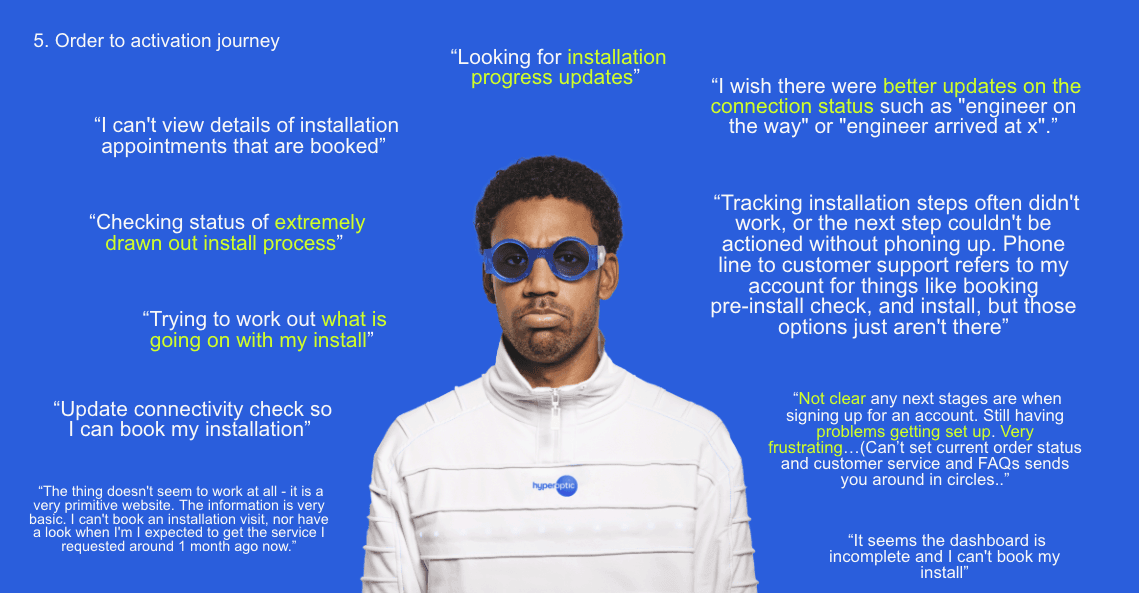
Some of the feedback of Hyperoptic customers from the MyAccount survey
Approach
Given our research on MyAccount, we had the data and user feedback identifying the problems. This project focused on executing and fixing the OTA journey, identified through three key steps:
Mapping Customer Journeys
Identifying Information Gaps
Designing a Great Experience
1. Mapping Customer Journeys
Objective:
Understand all pathways customers take from placing an order to activating their service
Approach:
Organized sessions with different teams and stakeholders to gather all necessary steps customers need to follow to activate their service.
Created and updated user flows for each customer group, ensuring we addressed the unique needs of every type of customer in the activation journey.
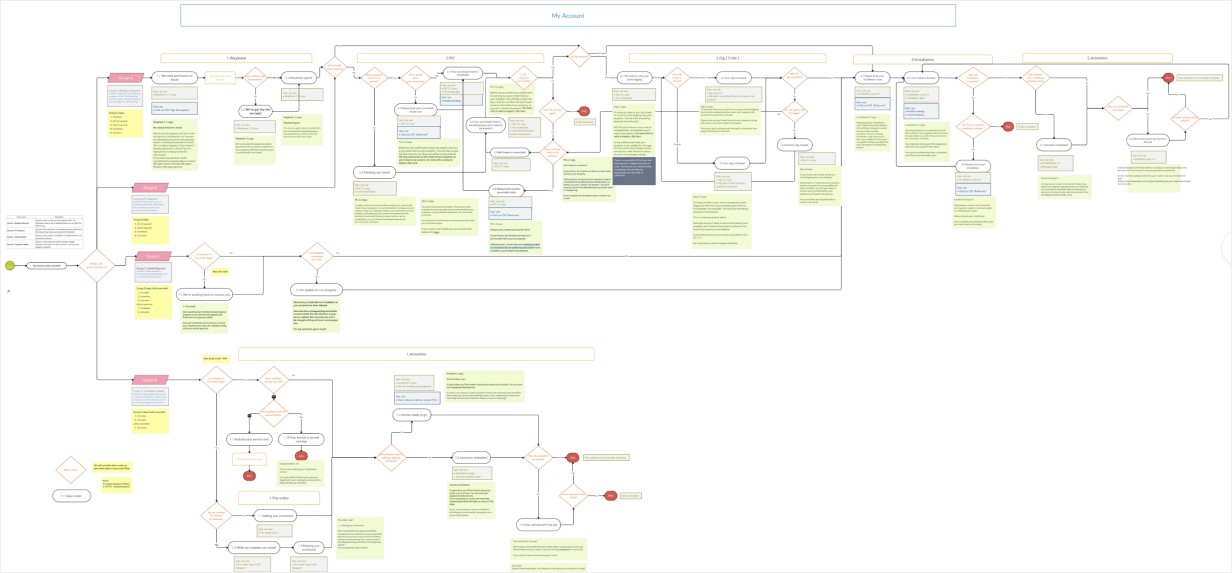
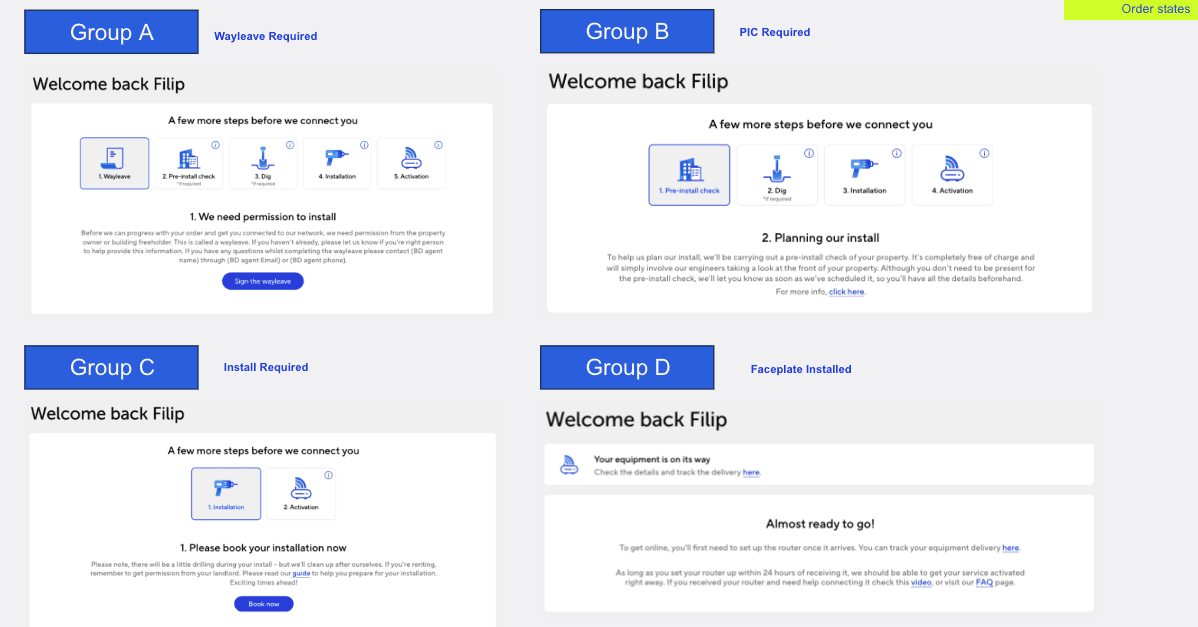
We identified four main groups (A, B, C, D) and developed a comprehensive understanding of the activation process from the customers' perspective:
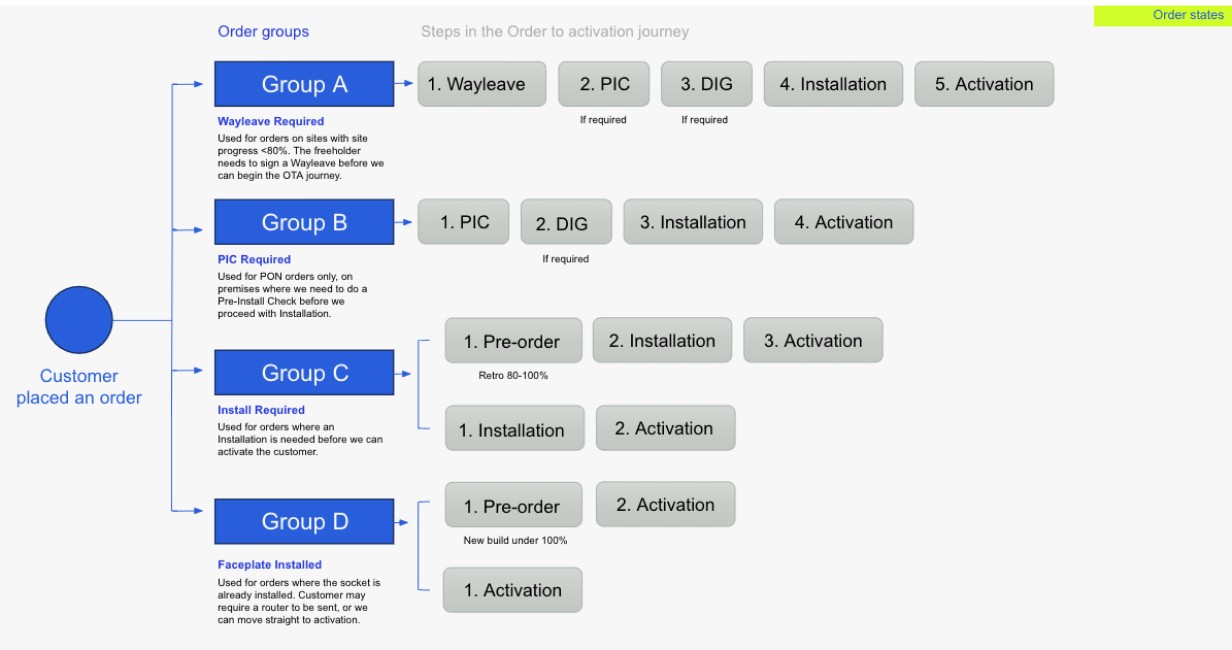
Challenge: Understanding each step in this journey was challenging. Group D could be active within minutes, while Group A customers had to wait up to 30 days or more due to additional steps like signing wayleave, pre-install checks, digging, installation, and activation.

Activation for Group A
2.Identifying Information Gaps
Objective: Understand how each step is currently shown in MyAccount. Analyze current MyAccount pages to identify where information is lacking.
Outcome: By identifying key information gaps, we figured out which sections needed improvement.

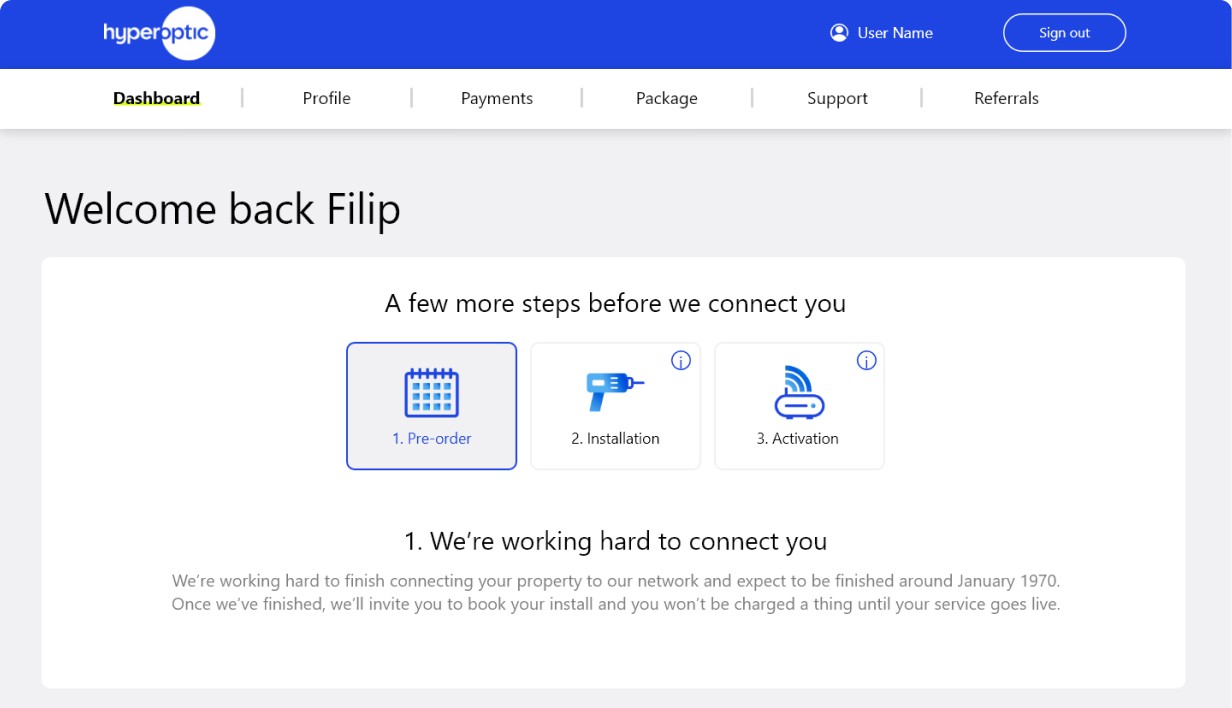
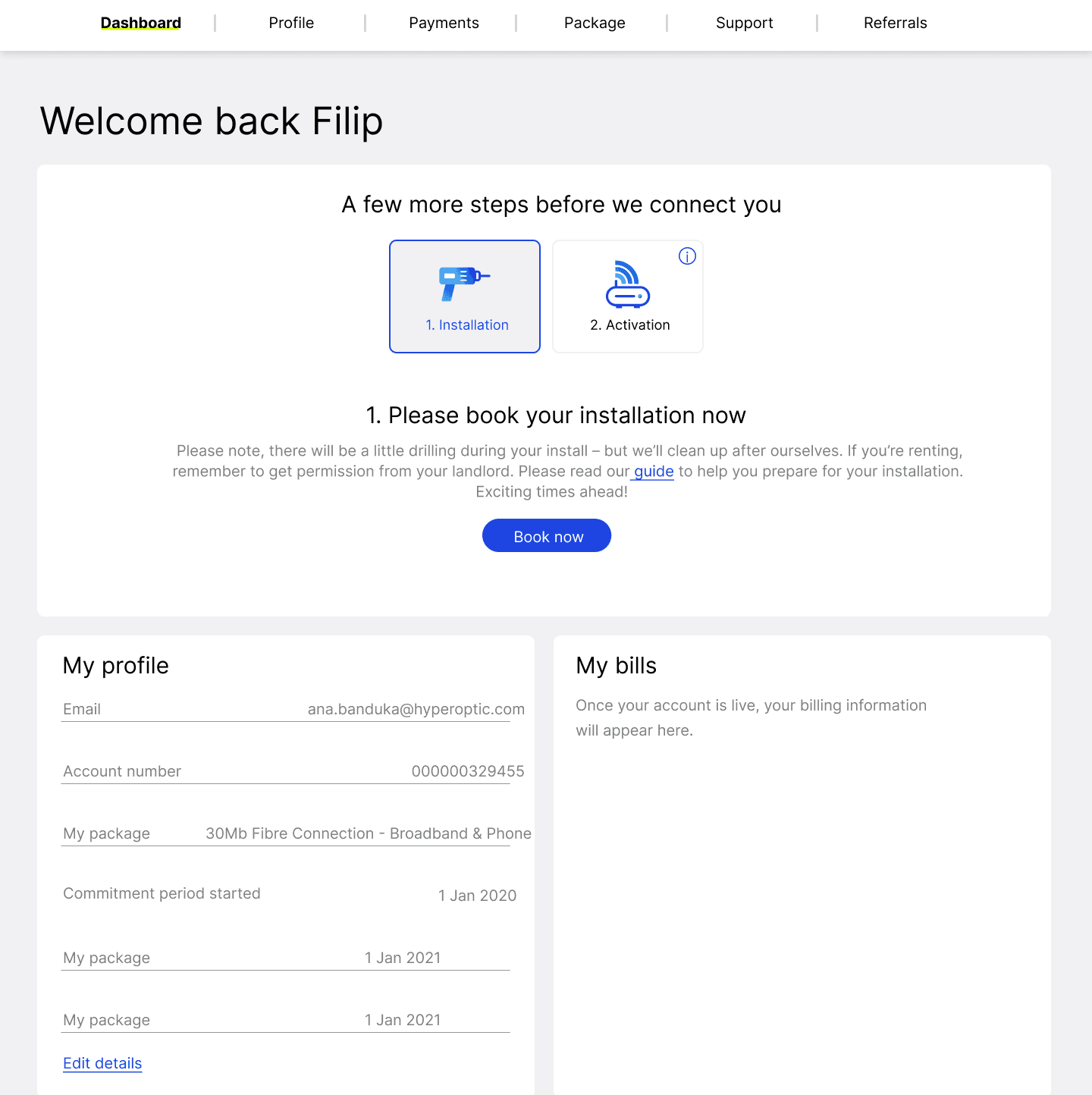
Screenshot of the old design
The old designs had no clear visual steps for users, or any information about the next steps. Every customer would see the same progress bar.
3. Designing a Great Experience
Objective:
Create an intuitive interface that guides users seamlessly through their activation journey.
Approach:
Focused on creating an intuitive, easy-to-navigate experience that addresses user needs we mapped out.
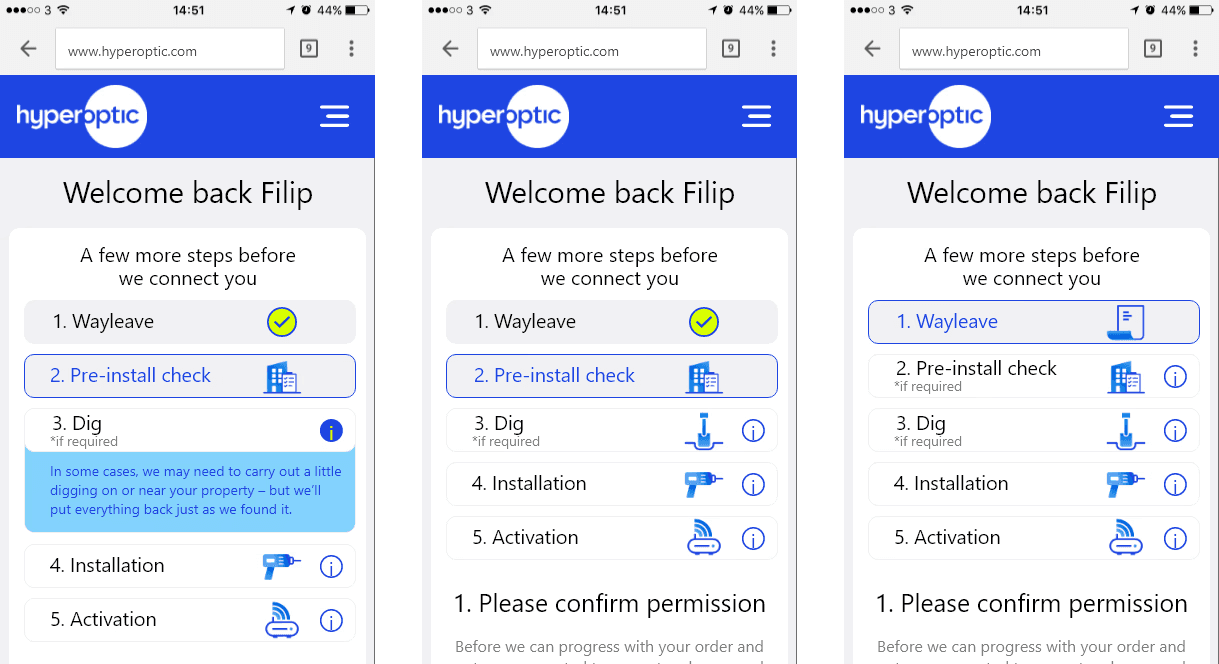
Screenshots of the new design in MyAccount dashboard - showcasing clear visual steps:


3.Summary of Key Improvements
Customized Steps: In the old design, every customer would see the same three steps with no clear indication of their current stage. The new design categorizes customers into four distinct groups, each with a customized screen and clear visual steps.
Slide from the Survey presentation to the stakeholders
Icons for Each Step: Added icons for each step to help customers quickly identify their current stage in the journey. Added checkmark icons for completed steps to provide a clear indication of progress.
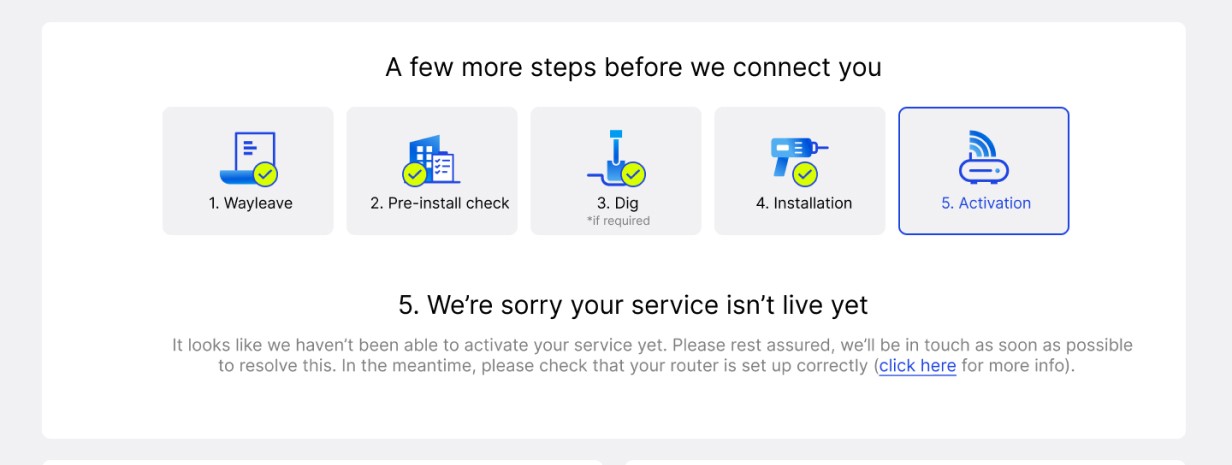
Green checkmarks to showcase progression in steps
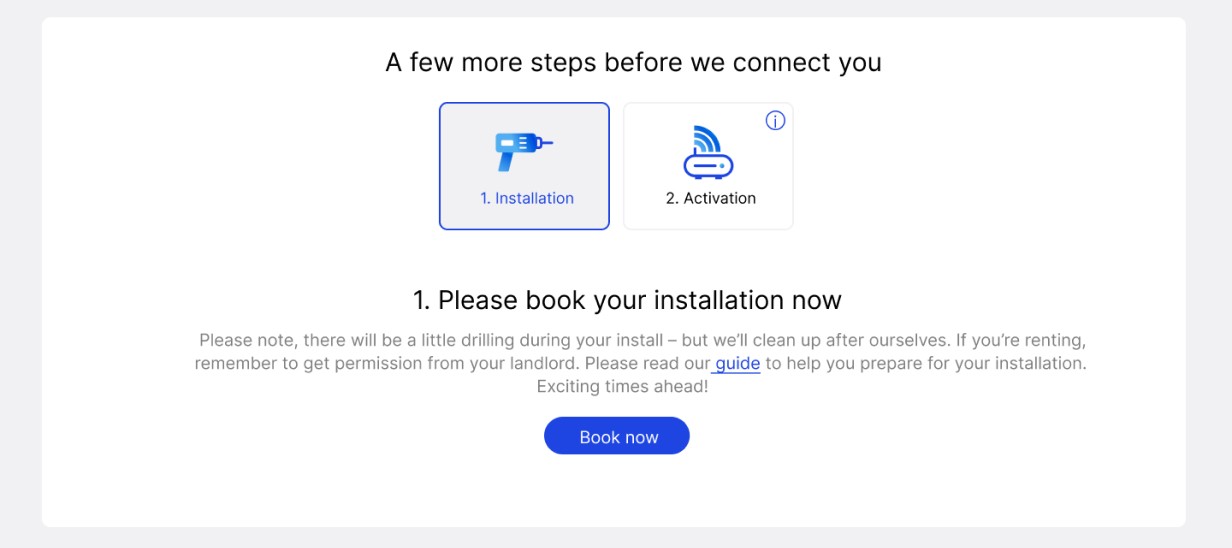
Tooltip Icons: Introduced small tooltip icons for future steps, allowing customers to quickly find out what’s next in their journey.
Conclusion
This project was a significant learning experience for me, particularly in enhancing my skills in mapping out customer journeys. The complexity of categorizing customers into four distinct groups and detailing every possible scenario was a challenging yet rewarding endeavor.
Designing over 30 screens with custom messages to guide users through each step required meticulous attention to detail and close collaboration with our copywriter. We held weekly sessions to update these messages based on ongoing findings from other teams and processes within the company.
One of the major challenges was ensuring that the design covered all scenarios, from the simplest to the most complex cases, and that users received clear, actionable steps in MyAccount.
I am particularly proud of the extensive research and numerous sessions with various teams, including customer service and engineers, to understand and address each group's unique processes. This project underscored the importance of thorough research, clear communication, and collaborative effort in creating a user-centric platform.
Overall, this project not only enhanced my research and design skills but also reinforced the value of a collaborative, user-focused approach to problem-solving. It was a fitting culmination of my time at Hyperoptic, leaving a positive impact on the user experience and the organization's processes.
What's next?
Want to see how I tackled another big challenge at Hyperoptic?
Explore my work on user research, pain point identification, and design enhancements in my other Hyperoptic project.
VIEW STUDY
Or are you more interested
in my latest work
Check out how I helped launch a real estate platform from scratch at my current company RGG.
VIEW STUDY
2024 Dejan Velimirovic. All right reserved.